
Download Xbox Game Bar – gaming tool, screen capture, game recording, Xbox social, streaming, Windows 10, Windows 11, game widgets, instant access, game sharing, game performance monitoring
Overview
The Xbox Game Bar is a built-in utility designed for Windows 10 and Windows 11 users who are passionate about gaming and content creation. Its primary purpose is to provide instant access to essential tools that enhance the gaming experience without interrupting gameplay. By enabling quick screen capture, video recording, social connectivity, and system monitoring, the app streamlines workflows for gamers who want to share moments or analyze performance in real time. It is particularly useful for those who stream live on platforms like Twitch or YouTube, as it allows for seamless recording and sharing without switching applications.
Target users include casual and competitive gamers, content creators, and streamers who value efficiency and integration. The app is especially relevant in the current digital ecosystem, where real-time sharing and performance tracking are key components of gaming culture. While the developer, Microsoft Corporation, is known for its robust ecosystem and integration across devices, the Xbox Game Bar stands out as a lightweight yet powerful tool within the Windows environment. It operates directly within the operating system, ensuring minimal overhead and maximum accessibility.
Real-world use cases include capturing a winning moment during a competitive match, recording a tutorial for a new game, or monitoring CPU and GPU usage during intense gameplay. The app supports both keyboard and controller activation, making it adaptable to different user preferences. Although the developer did not provide additional technical details about system-level integration, its seamless operation suggests strong optimization for Windows platforms.
Key Features & Functionality
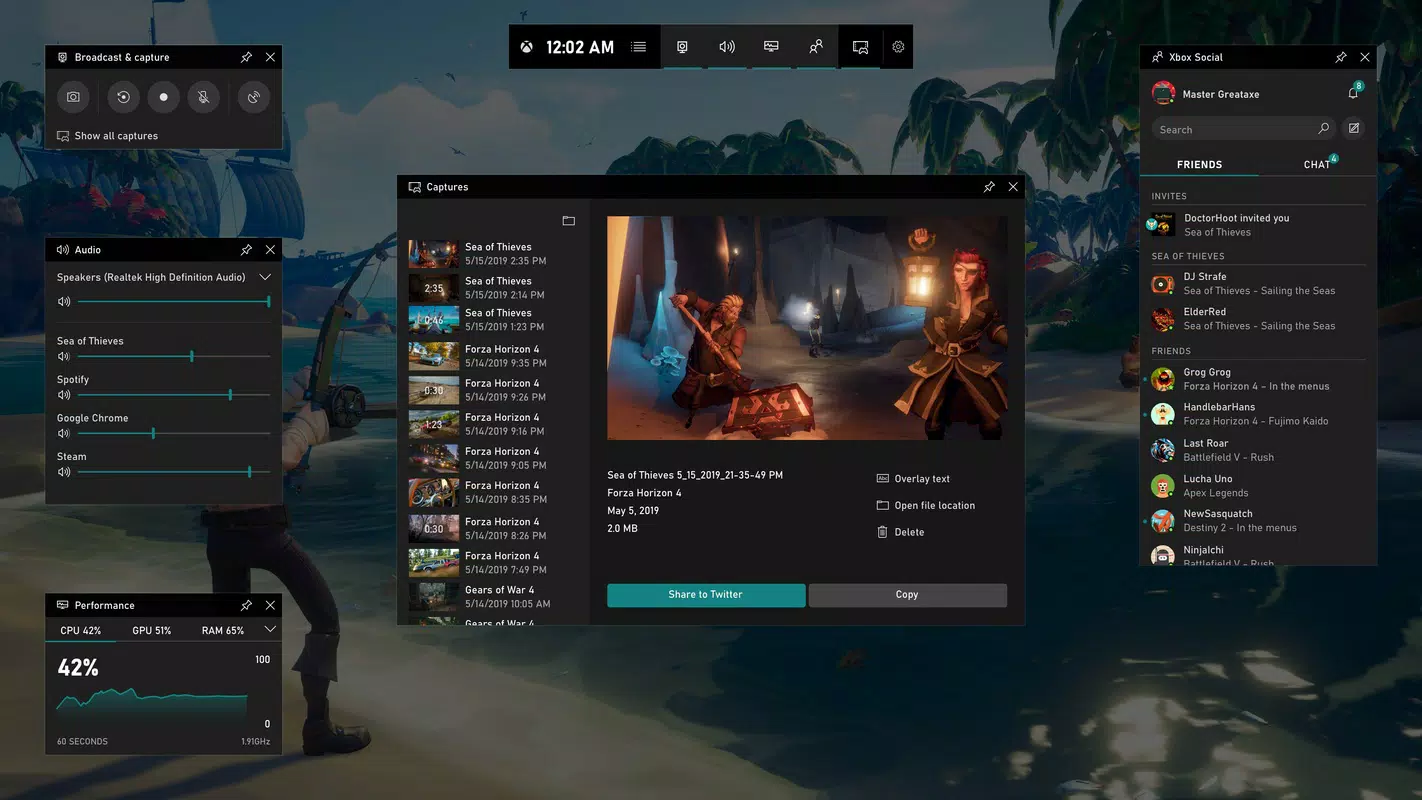
- Instant Screen Capture: Users can take screenshots with a single key combination (Windows + Alt + PrtScn), preserving high-quality images without interrupting gameplay.
- Game Recording: The ability to record gameplay sessions in real time, with options to start and stop recording with a simple button press.
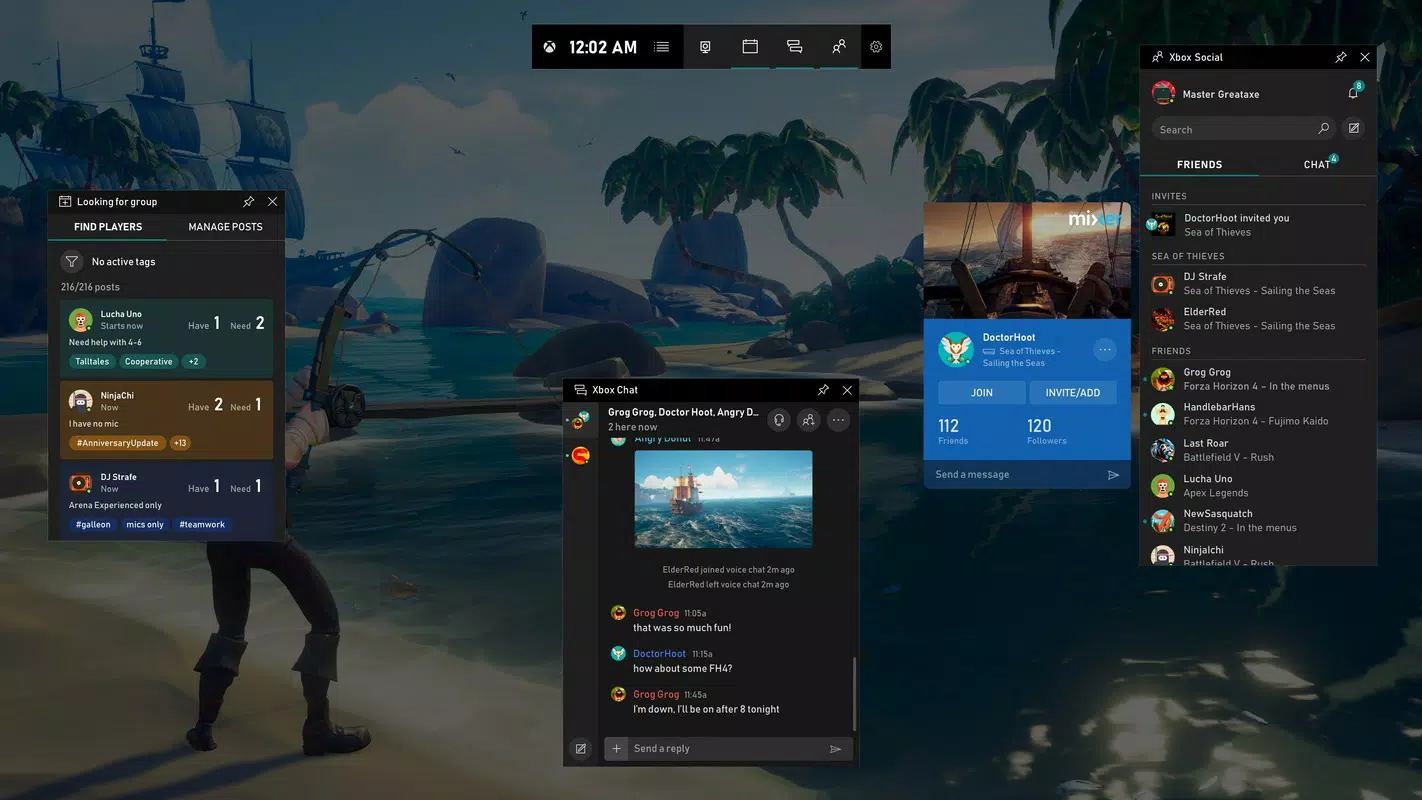
- Integrated Social Features: Access to Xbox social network functions, including finding and messaging friends, viewing their online status, and joining sessions.
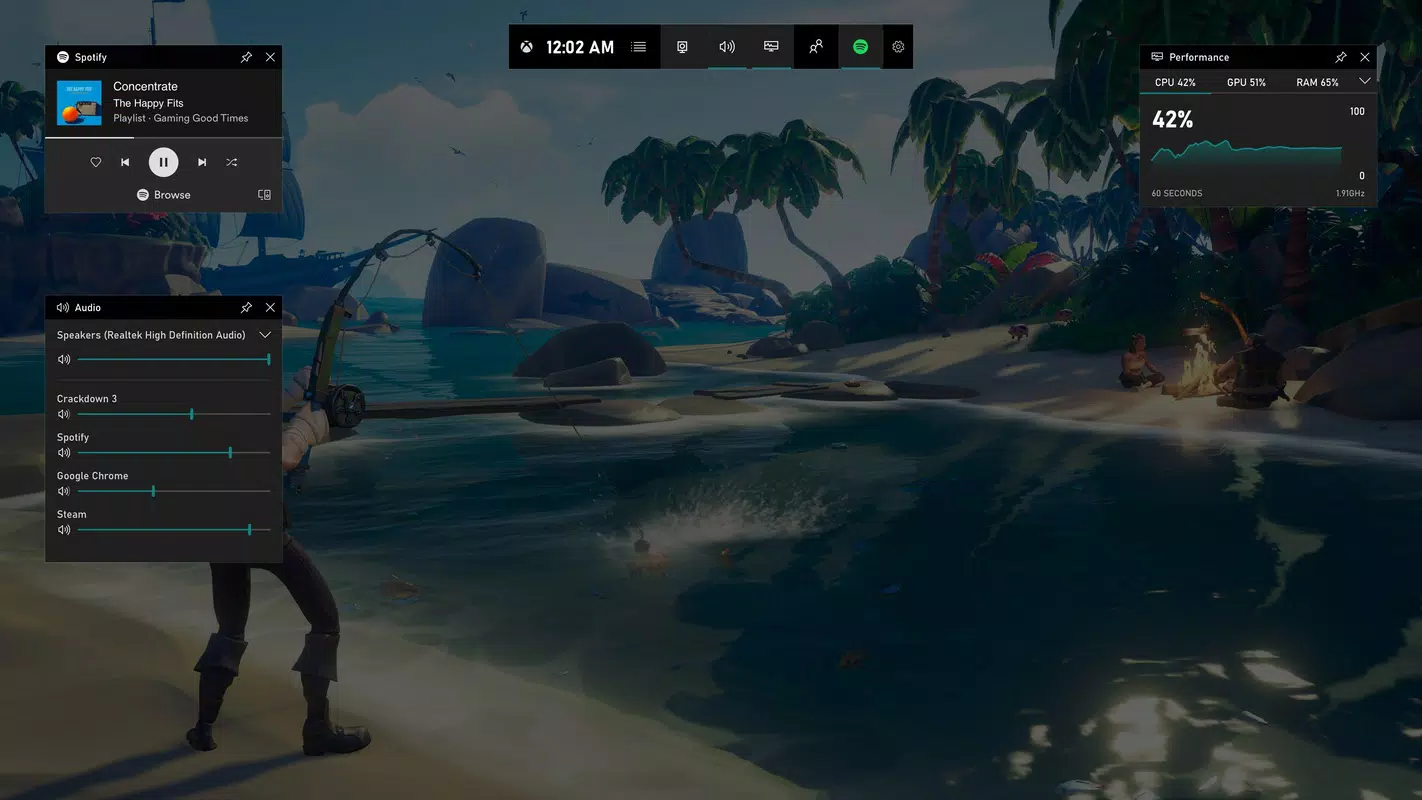
- Performance Monitoring Dashboard: Real-time display of system metrics such as frame rate, CPU usage, and memory consumption during active gaming.
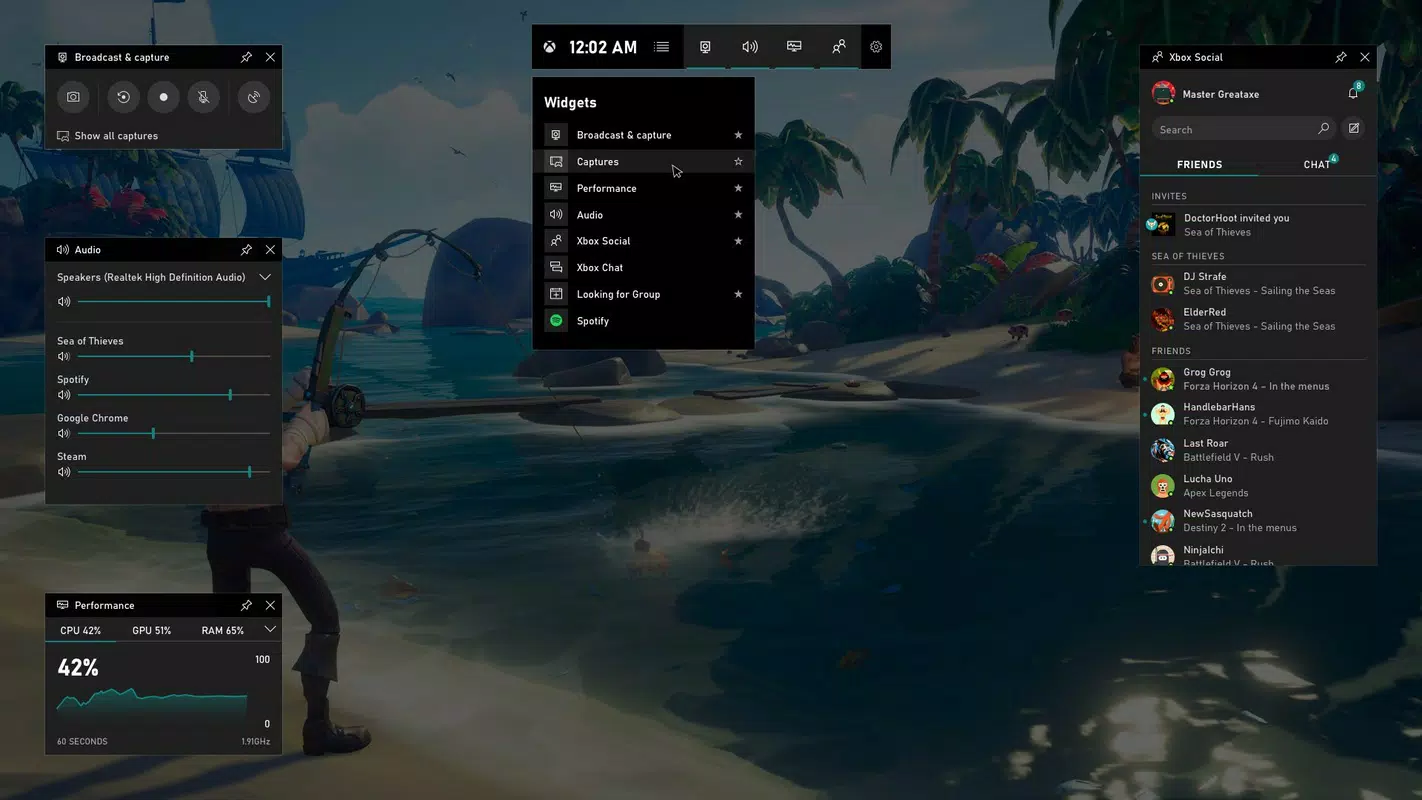
- Customizable Widgets: Users can enable or disable widgets such as the friends list, game stats, and quick access to recording tools.
- Streaming Integration: Direct support for streaming to platforms like Twitch, allowing users to broadcast gameplay with minimal setup.
These features are particularly beneficial during live streams, where timing and efficiency matter. For example, a streamer can quickly capture a highlight, check their system performance, and share it with their audience—all without exiting the game. Similarly, a casual gamer can record a funny moment and instantly share it with friends. The integration with Xbox controllers via the Xbox button ensures accessibility for console-style users on PC. Although the developer did not list specific requirements for performance or compatibility, the app functions reliably across various Windows configurations.
Interface, UX & Performance
The Xbox Game Bar features a minimal, overlay-based interface that appears seamlessly on top of the game window. Its design prioritizes clarity and speed, using a clean layout with intuitive icons and responsive controls. The navigation is straightforward: users access the bar via a keyboard shortcut or controller button, and then interact with tools through a compact, context-aware menu.
Visual style remains consistent with Windows design language, blending smoothly into the system’s aesthetic. The interface is unobtrusive, allowing users to focus on gameplay while still having quick access to critical tools. Responsiveness is strong, with near-instant activation and minimal input lag. Although the developer did not list formal performance metrics, the app operates efficiently even during high-intensity gaming sessions.
Stability is maintained through deep integration with the Windows operating system, reducing the likelihood of crashes or conflicts. The app does not consume significant system resources, making it suitable for both high-end and mid-tier hardware. Compatibility information was not fully disclosed, but the tool is designed to work across Windows 10 and Windows 11 environments. The developer did not specify minimum OS requirements, but its presence in recent Windows updates suggests broad support.
Platform Compatibility & Technical Requirements
Xbox Game Bar is available on the Windows platform, compatible with both Windows 10 and Windows 11 operating systems. The current version is 10.0.22621.2506, and the app occupies 34.8 MB of storage space. The application is free to use, with no in-app purchases or subscription fees.
Specific requirements were not listed, and the developer did not disclose minimum system specifications. However, given its lightweight nature and integration with the OS, it is likely optimized for a wide range of hardware configurations. The app is not available on mobile platforms such as Android or iOS, as it is a native Windows utility. Users should ensure their system is up to date to maintain full functionality.
Pros and Cons
Pros
- Seamless integration with Windows 10 and Windows 11
- Lightweight and efficient, with minimal system impact
- Quick access to screen capture and recording via keyboard or controller
- Supports real-time performance monitoring during gameplay
- Integrated social and streaming features for content creators
- Free to use with no hidden costs
Cons
- Not available on mobile platforms (Android, iOS)
- Specific system requirements were not disclosed
- Functionality is limited to Windows-based gaming environments
- May not support older Windows versions beyond Windows 10
- Some advanced features may require additional setup or configuration
FAQ
Is Xbox Game Bar free to download and use?
Yes, Xbox Game Bar is completely free to download and use. It is included with Windows 10 and Windows 11 and does not require any payment or subscription.
Can I use Xbox Game Bar on Android or iOS?
No, Xbox Game Bar is a Windows-only application and is not available for Android or iOS devices. It is designed specifically for the Windows operating system.
What are the minimum system requirements?
The developer did not specify minimum system requirements. However, the app is integrated into Windows 10 and Windows 11 and is optimized for modern hardware.
How do I activate Xbox Game Bar?
You can activate Xbox Game Bar by pressing the Windows key + G on your keyboard. If you have an Xbox controller connected, pressing the Xbox button will also open the tool.
Does Xbox Game Bar affect game performance?
Based on available information, Xbox Game Bar is designed to have minimal impact on game performance. It operates efficiently in the background and does not significantly consume system resources.
Final Thoughts
Xbox Game Bar stands out as a powerful, no-frills tool for gamers and content creators on Windows. Its ability to deliver instant access to screen capture, recording, performance monitoring, and social features makes it an essential utility for anyone invested in the gaming experience. The seamless integration with the operating system ensures reliability and ease of use, while the free pricing model enhances its accessibility.
While it is limited to Windows platforms, its functionality is well-suited for streamers, competitive players, and casual gamers alike. The lack of mobile availability is a notable limitation, but for users on Windows 10 or Windows 11, it delivers significant value. Whether you're capturing a highlight, analyzing system performance, or sharing with friends, Xbox Game Bar enhances the gaming workflow without disruption.
Download Xbox Game Bar now


